Fast, private and direct
MEPCO Bill Check Online
Enter your 14-digit reference number or your Customer ID. Your bill opens on the official PITC page in a new tab.
- No sign-up
- Number not stored
- Official PITC result
Official result via PITC
Check Your Bill اپنا بل چیک کریں
Choose an account number below. نیچے اکاؤنٹ نمبر منتخب کریں۔
Independent guide: not affiliated with MEPCO, PITC, WAPDA or any government body. Bills open only on the official PITC website. Read the disclaimer.
Stay safe
PITC’s official complaint portal warns: never send money for a bill, a meter, repairs, cancelling a fine, a bill adjustment, a new connection or a meter replacement through Easypaisa, JazzCash or a direct bank transfer to any person’s account. If someone asks you to, report it to the 118 helpline. This site never asks for money, a CNIC or your bill number.
How to check your MEPCO bill online
To see your MEPCO electricity bill online, you do not need an account, a CNIC, a phone number or an email address. MEPCO’s own website, mepco.com.pk, does not show the bill itself: its “Online Bill Check” link opens the same official PITC bill page.
- 1
Have your number ready.
The official PITC page searches by a 14-digit reference number or by Customer ID.
- 2
Choose its type.
Select Reference No or Customer ID in the checker above.
- 3
Enter the digits only.
Type or paste the full number without spaces, dashes or letters. The official form accepts digits only.
- 4
Open your bill.
Press the check button. The official PITC bill page opens in a new tab, and your bill is shown there.
There is no city to pick. The official MEPCO bill page has no city selector, so the same page is used whether you live in Multan or anywhere else MEPCO supplies.
PITC runs the same bill service for 11 power distribution companies, MEPCO among them, and MEPCO’s own website links to it. If you open PITC’s site yourself, make sure you choose the MEPCO bill page and not another company’s.
Which number does the official page accept?
The official MEPCO bill page on PITC offers two choices: Reference No, a 14-digit number, and Customer ID. A meter number or a CNIC is not one of the options.
As shown on MEPCO’s website on 7 November 2026, MEPCO tells consumers to enter their “14-digit reference number or 10-digit customer ID” to view and download a bill. PITC describes the same service as finding your bill by “reference or consumer number”. On the printed bill, the second number is labelled Consumer ID.
Not sure which number is which? Our reference number guide explains what the official form expects.
Where is the reference number on your bill?
Look at the top-left box of your bill, headed Consumer Detail: the first field, Reference No, holds the 14-digit number, and Consumer ID is the field just below it. Both numbers are printed again on the bank slip at the bottom of the bill.
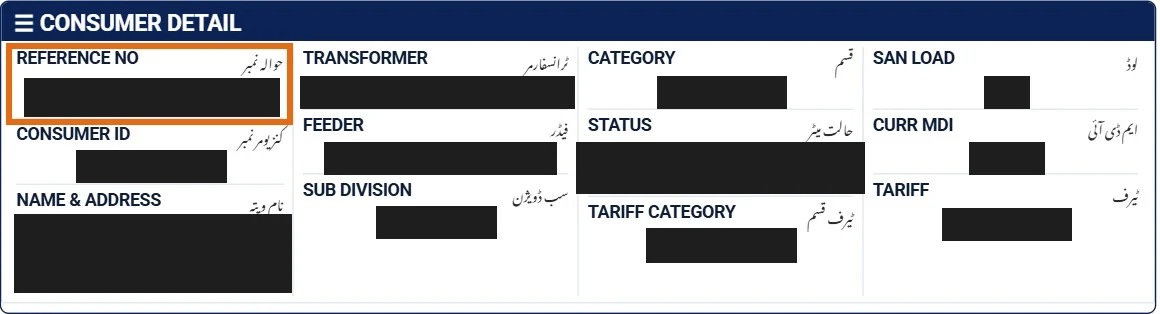
See both places, with pictures, in our guide to the MEPCO 14-digit reference number.
How to read your MEPCO bill
A MEPCO bill is laid out in labelled boxes. The tables below follow the labels printed on a MEPCO bill for July 2026 and say, in plain words, what each one shows. We used the labels only; no personal or account details from that bill appear on this site.
Other kinds of connection can show different labels or extra boxes. We do not explain tariff rates, tax rates or the fuel price adjustment formula, because we have not checked an official source for them.
How to read these tables: the first column is the label printed on the bill (the bill prints labels in capital letters; we use normal capitals). The “What it shows” column is our plain-language reading of that label, not an official MEPCO definition, except where we name an official source.
Consumer Detail box
This box, at the top left, identifies your connection.
| Label on the bill | What it shows |
|---|---|
| Reference No | The 14-digit number the official bill page asks for. Use it in the checker above. |
| Consumer ID | A second number for the same account. The official page accepts it when you choose the Customer ID option. |
| Name & Address | The name and address printed for the connection. |
| Transformer | The transformer that supplies your connection. |
| Feeder | The feeder, the supply line your transformer is connected to. |
| Sub Division | The MEPCO sub-division office for your connection. |
| Category | The category your connection is placed in. |
| Status | The status recorded for the connection. |
The box also prints Tariff Category, Tariff, San Load and Curr MDI. We have not yet confirmed official definitions for these labels, so we do not explain them here, and this page does not explain tariff rates.
Dates and the amount to pay
These boxes tell you which month the bill covers, when to pay and how much.
| Label on the bill | What it shows |
|---|---|
| Bill Month | The month the bill is for. |
| Reading Date | The date your meter was read for this bill. |
| Issue Date | The date the bill was issued. |
| Due Date | The last date for paying the amount payable within the due date. |
| Payable Within Due Date | The amount to pay on or before the due date. |
| L.P Surcharge | The late payment surcharge, the extra charge for paying after the due date. |
| Payable After Due Date | The amount to pay after the due date, with the surcharge included. |
Meter Info box
This box shows the meter readings your units come from.
| Label on the bill | What it shows |
|---|---|
| Meter No | The number of your electricity meter. The official bill search does not accept it. |
| MF | The multiplying factor of your meter, used with the readings to work out the units. |
| Previous Reading | The meter reading at the previous bill. |
| Present Reading | The meter reading for this bill. |
| Units | The units of electricity charged on this bill. |
MEPCO’s FAQ says meters are read once a month, on the date printed on the bill. If a bill looks too high, it suggests reading your meter yourself and comparing it with the bill. If they do not match, use the complaint routes below.
Bill Charges Breakdown
This box lists the parts that add up to your bill. We describe each line, not how it is calculated.
| Label on the bill | What it shows |
|---|---|
| Total Electricity Charges | The charges for the electricity used, before subsidies. |
| Subsidies | Any subsidy shown for this bill. |
| Net Electricity Charges | The electricity charges after subsidies. |
| Taxes | The taxes on this bill. We do not list tax rates. |
| Current Bill | The amount for this month’s bill. |
| Arrears | Unpaid amounts carried over from earlier bills. |
| Installment | An instalment amount, if one applies to the account. MEPCO’s app lists “Request for installment” among its services. |
| Adjustments | Any correction added to or taken off the bill. |
| Total FPA | The total fuel price adjustment on this bill. We do not explain how it is worked out. |
| Grand Total | The final total of the bill. |
If Arrears shows an amount you have already paid, MEPCO’s FAQ says to ask for a correction and show your paid-bill receipt at your sub-division, a customer service centre or the bank branch.
Other parts of the bill
| Part of the bill | What it shows |
|---|---|
| Bill History | Earlier months, with the units, the bill amount and the payment for each month. |
| QR code | A code with a note in Urdu that asks you to scan it for details of the charges. MEPCO’s app page did not mention a QR scanner when we read it on 7 November 2026. |
| Net Metering Connection | A box we saw on a net-metered connection’s bill. |
| Bank slip | The part at the bottom, marked “Bank Stamp”. It repeats the Consumer ID and the Reference No. |
How to make a MEPCO complaint
MEPCO’s website sends online complaints about supply, billing or outages to PITC’s complaint portal, and says a complaint needs your consumer number, the complaint type and a description. PITC lists these ways to complain without visiting an office:
- Online. On the PITC complaint portal, search by your 14-digit reference number or mobile number, choose Line Complaints, Non-Line Complaints, or Leads / Requests / Others, and attach a file of up to 2 MB (jpeg, png, gif, jpg, mp3 or mp4) if needed.
- Phone. Call 118.
- SMS. Send an SMS to 8118 with your bill reference number, the problem, a contact mobile number and the consumer name.
- App. PITC names the DISCO LIGHT app. MEPCO’s own MEPCO SMART app lists Power Complaint, Track Complaints and NEPRA Complaints.
Each complaint gets a computer number, PITC says. The portal says complaints are acknowledged within 24 hours and aims to resolve them within 14 days; follow yours with Track by Reference or Track by Ticket. If you are not satisfied, it names a written escalation route to its Head of Quality & Assurance.
Fallen wire or a live pole? MEPCO’s safety guide says to inform the nearest complaint centre at once and keep children away until staff arrive. Free a person stuck to a live wire only with a dry bamboo or wooden rod, never by hand.
Power cuts: planned shutdowns and feeder status
Planned shutdowns. MEPCO posts advance notices of shutdowns for maintenance, upgrades and repairs on its electricity shutdown page. On 7 November 2026 they were PDFs listed by grid station or circle, newest first. MEPCO says the schedule can change, so check again close to the date.
Your feeder today. PITC’s Load Management Portal, linked from MEPCO’s home page for feeder-wise load shedding, searches by a 14-digit reference number or a 6-digit feeder code, and also by grid station, feeder or city. PITC says it shows the feeder’s status, hours off and an ON/OFF timeline. We have not confirmed that the Feeder field on your bill shows this 6-digit code, so the reference number is the simpler search.
MEPCO’s “Load Shedding Schedule for Consumer” page held a July 2024 schedule when we read it on 7 November 2026. Do not treat it as current.
About MEPCO and the area it serves
MEPCO is the Multan Electric Power Company, with its head office on Khanewal Road, Multan. As shown on MEPCO’s website on 7 November 2026, it calls itself Pakistan’s largest power distribution company under PEPCO, serving 13 districts in South Punjab. The website does not name the districts, so we do not list them.
MEPCO also says it is the only distribution company in Pakistan that borders three provinces. It connects with five other power companies (HESCO, PESCO, QESCO, FESCO and LESCO) and shares a border with India near Minchinabad in Bahawalnagar.
On the same date, its website listed nine administrative zones, which its contact page calls circles: Multan, Khanewal, Sahiwal, Bahawalpur, Bahawalnagar, Muzaffargarh, Dera Ghazi Khan, Rahim Yar Khan and Vehari. All of them use the same official bill page.
| MEPCO in numbers | Figure |
|---|---|
| Consumers | 8,915,282 |
| Grid stations | 159 |
| Feeders | 1,945 |
| HT/LT lines | 128,239 km |
These figures are as shown on MEPCO’s website on 7 November 2026. The website gives no date for them.
Other official MEPCO services
These are run by MEPCO or PITC, not by this site. As read on 7 November 2026:
- MEPCO SMART app. MEPCO’s app page links to it for iPhone and Android. Besides Pay Bill and complaints, it lists Request for installment, Due Date Extension, Meter Change Request, Request for Change of Attributes (owner name, load or tariff) and Track New Connection. Terms and eligibility are not stated.
- Bill by SMS. MEPCO’s website says it offers an SMS service to receive bills on your mobile phone, but the page we read on 7 November 2026 gives no short code or keyword, so we cannot tell you one. The 8118 SMS number is for complaints, not for bills.
- CNIC and mobile registration. PITC’s registration portal needs the bill reference number, CNIC and mobile number, confirmed by a one-time PIN. It updates the occupant only; a change of ownership needs a visit to the nearest customer facilitation centre or RO office.
- New connection. MEPCO points to the national ENC portal: online form, documents such as CNIC and property proof, fee paid digitally. A form to download is also offered. We do not list fees.
- Net metering. MEPCO’s net metering page publishes the SOP (dated 24.08.2016), application, agreement, a Punjab Government notification and NEPRA SRO 892(1)/2015. Steps: certified installer, application, inspection, No Objection Certificate, bi-directional meter.
Searching for a “WAPDA bill” in MEPCO’s area?
Many people still search for a “WAPDA bill”. In MEPCO’s area the electricity bill is issued by MEPCO, and it opens on the official PITC MEPCO bill page. Check it with the same 14-digit reference number in the checker above. Some people type the name as “mapko” or “mapco”; it is the same company, the Multan Electric Power Company.
Bill not arriving or not opening?
- Bill not arriving. MEPCO’s FAQ tells consumers whose bills regularly do not arrive on time to contact their sub-division office. Its name is printed in the Consumer Detail box. Meanwhile, use the checker above or our duplicate bill guide.
- The checker does not open your bill. Go to the official PITC bill page yourself and enter the same number there.
Frequently asked questions
What number do I need to check a MEPCO bill?
The official PITC page asks for a 14-digit reference number or a Customer ID, which MEPCO’s website calls a 10-digit customer ID. A meter number or a CNIC is not one of the options. Choose the matching option before you enter the digits.
Where is the reference number on my MEPCO bill?
It is the first field, Reference No, in the Consumer Detail box at the top left, and it is repeated on the bank slip at the bottom.
Why does the official form say “Given Ref/App No is invalid”?
The form accepts 10 to 14 digits and nothing else. A space, a dash, a letter, or a number shorter than 10 or longer than 14 digits makes it show this message. Clear the box and type the digits again.
Can I check my MEPCO bill with my CNIC?
On the official pages we read on 7 November 2026, there is no bill search by CNIC. The CNIC is used on PITC’s registration portal to link a CNIC to an electricity account, and MEPCO’s app offers an “Update Tenant CNIC” service. See our CNIC guide.
Can I print a duplicate bill?
PITC says its bill service lets you download or print a duplicate bill for payment at any branch. MEPCO’s FAQ adds that duplicate bills are available at its customer service centres. See our duplicate bill guide.
When is my MEPCO bill due?
The due date is printed on your bill. The NEPRA Consumer Service Manual 2025, published on mepco.com.pk, says the due date is within 15 days of the issue date, and you must still get seven clear days to pay from the day the bill actually reaches you (clause 6.5). If the due date falls on a holiday, the next working day becomes the due date (clause 6.4.1). If late delivery leaves you less than seven clear days, the company’s officers can extend the due date without a late payment surcharge (clause 10.3.1(f)).
Does MEPCO have an official app?
Yes. MEPCO’s website lists MEPCO SMART for iPhone and Android, with services such as Pay Bill, Bill Estimator, Power Complaint and Due Date Extension.
How do I make a complaint to MEPCO?
Use PITC’s complaint portal, linked from MEPCO’s website, call 118, or send an SMS to 8118 with your bill reference number, the problem, a contact mobile number and the consumer name.
Should I pay a bill or a connection fee through someone’s Easypaisa or JazzCash account?
No. PITC’s complaint portal warns never to pay for bills, meters, repairs, fines, adjustments, new connections or replacements through Easypaisa, JazzCash or a bank transfer to any person’s account. Report such a request to 118.
How can I check power cuts in my area?
For planned work, see the notices on MEPCO’s electricity shutdown page; MEPCO says they can change. For your feeder today, PITC’s Load Management Portal searches by your 14-digit reference number or a 6-digit feeder code.
How do I scan the QR code on my MEPCO bill?
The bill carries a QR code with a note in Urdu that asks you to scan it for details of the charges. MEPCO’s app page did not mention a QR scanner when we read it on 7 November 2026, so we do not point you to one. To see the charges, open your bill on the official PITC page with your reference number.
Is this the official MEPCO website, and do you store my bill number?
No to both. This is an independent information website, not affiliated with MEPCO, PITC, WAPDA or any government body. The checker opens the official PITC page in a new tab; we never see or store your number.
About this site
mepcobillcheckonline.com is an independent guide. We never ask for, see or store your reference number, Customer ID or CNIC. Every official fact here comes from the MEPCO, PITC and NEPRA sources below; the bill reading guide follows the labels on a real MEPCO bill, with personal details left out. More about this site and how we check our information.